

Posts Tagged ‘flash’

Flash in the Pan? Hardly

Friday, April 30th, 2010

By now, I would guess that over 95% of people interested in Flash have read the Steve Jobs blog rant about why Apple will never implement it on its mobile devices.  That’s the same percentage of web browsers that have Flash installed, beating Java, Quicktime, Windows Media Player, and so on.  There is a greater likelihood that your site is going to be viewed correctly in Flash than in any browser, no matter how standards-compliant.

With the iPod and iPhone, Apple looked like world-beaters, and when the app store opened, developers flocked to pay Apple $100 for the privilege of downloading the app SDK; they began furiously pumping out apps and biting their fingernails while Apple’s team personally verified the worthiness of each app.  Okay, we get it: part of the iPhone experience is knowing that every app has been tested and approved; it’s quality control.

It seems that much of the debate right now is whether Flash is an open standard and/or whether apps written in objective C are open and/or which company is behaving like the biggest crybaby.  Really, neither is an open standard.  If you want to develop an iPhone app on a Windows machine or if you’re looking to compile some Actionscript without running Flash, you have to use third-party software in either case.  These companies are like two toddlers whining at one another for not wanting to share their toys.
(more…)

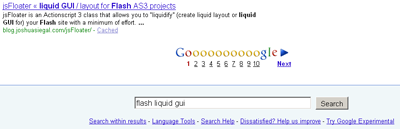
jsFloater is top ten on google!

Wednesday, February 10th, 2010

Celebrating jsFloater’s appearance on the first result page in a google search for “Flash Liquid GUI”!

Hangin at the Bottom

Hangin at the Bottom

We’re just psyched to be in a google result page with the likes of James O’Reilly and actionscript.org.

Hooray!  If you haven’t checked out the code yet, by all means please do.

Introducting jsFloater

Friday, December 4th, 2009

jsFloater is an Actionscript 3 class that allows you to “liquidify” (create liquid layout or liquid GUI for) your Flash site with a minimum of effort.

Objects can be “floated” in a variety of ways, and with a great deal of flexibility: you can assign pads to your objects within the context of their float, and even use simple math to create custom interactive behaviors for your objects.  The package is extremely lightweight and flexible.

jsFloater also computes the centering math on your own objects for you.  Standard movieclip 0,0 top left registration is expected.

For an example, see the jsFloater example swf, which contains an object for each available float method in the jsFloater class.  Mousing over these objects reveals their method, their float mode, and their current pixel x – y coordinates.  The example swf acts as a kind of visual API guide.

How To Use jsFloater

Friday, December 4th, 2009

To use jsFloater in your projects, download and extract the zip file which contains the example FLA file and the package with the AS script, which is the class itself.  If you want, you can open up the FLA example file and look at that code (and its comments) to get a working idea of how to use the class.

The class is located in the package, com > seagull > jsfloat.   Move the directory “seagull” into your “com” directory, and add the following line of code either in your appropriate package declaration(s) or, if you are using Actionscript 3 within your own FLA file, at the top of your script:

import com.seagull.jsfloat.*;

Before you start floating your elements, several other things must happen:

(more…)

The jsFloater API

Friday, December 4th, 2009

The API for jsFloater consists of 3 publicly available methods: floatHor, floatVer, and – you guessed it – floatHorVer.  The first of these will float an object horizontally; the second will float an object vertically, and the third will float an object both horizontally and vertically.

Because web browsers are anchored to the top left of the window, you may want to use a combination of these three methods to achieve your desired results.  jsFloater allows you to define a minimum stage size, so that your elements won’t crash together if the user squashes the page size down by dragging the browser window’s bottom right corner to the middle of the screen, for example.  This minimum stage size is passed to the class constructor on instantiation.

There is a visual guide to the API available both in the downloadable zip file and also for browsing on this site.  You can mouse over the various objects in the visual API guide to reveal what method has been used to float them, which align mode they are employing, and what their current pixel x – y coordinates are.

jsFloater allows you several types of floating, in addition to the ability to “pad” or “stick” your floats, as will be expained below.  The types of floating are proportional (based off of the difference between the minimum stage size and current stage size) or Strict, meaning based only on the current stage size.

The methods:

(more…)

The jsFloater Box

Friday, December 4th, 2009

As you may have learned from the API, the jsFloater class gives you a lot of flexibility in your floats, with “stick” values and padding available to add to your floating object x and y values.  I thought it might be useful, however, to break down some of the available methods in terms of a box model, to help explain two different types of floating you can use: what we’re calling proportional and strict.

jsFloater requires you to define a minimum and width and height for your stage, so that you can take a given design comp and figure out how small the browser window can get before the objects begin crashing into each other and/or overlapping in undersirable ways.  This is an issue common to liquid GUIs / layouts, one which jsFloater lets you fix.  But, you may not always want your elements to float based upon the very edges of the current browser window: if, for example, your design comp figures at a minimum window size of 800 x 600, you may want your elements to float somewhere between the minimum value and the edge of the window.  You could accomplish that with typical liquid GUI layout types and a bunch of your own math – or, you could let jsFloater do it for you, using the proportional float modes available.

We’ll examine the basic boxes in a moment, but first let’s recap the horizontal and vertical floats.  The images below are all taken from the jsFloater visual API example, which can also be exported from the FLA file included in the download.  It may help you to have the visual API guide open while you read through this example, so you can experiment and see how the objects move and react.

First, let’s look at the available align modes for the floatVer (vertical) method.

(more…)

Math and jsFloater – dynamic drop shadow

Friday, December 4th, 2009

So, in other posts, we’ve talked about jsFloater being able to take your computed integer values and use them to create some dynamic effects based on the browser resizing.

Here is a really simple example: it’s a drop shadow that changes its distance based on the size of the window, and as you resize the window the distance changes as well.  Of course, it’s up to your imagination to come up with other uses, but this is a simple example that gets to the point.

(more…)

Download jsFloater

Friday, December 4th, 2009

» Download jsFloater (zip)

Released under Creative Commons license


Thanks for downloading my code!  Hope it brings you lots of fun and saves you a bunch of work.

If you like it, please spread the word.

If you haven’t already, I strongly encourage you to check out the API and the How-To page.

Thanks!

Josh

jsFloater FAQ

Friday, December 4th, 2009

How does jsFloater differ from other liquid GUI classes for AS3?

In two main ways: (1) jsFloater requires you to define a minimum area for your floating, so that the objects in your liquid layout will never crash together in undesired ways; (2) jsFloater lets you pad your floating objects, gives you several modes to use, and also lets you use your own math to create enless dynamic effects.

How is jsFloater released?  Can I adapt jsFloater source code?

jsFloater is released under a Creative Commons Attribution 3.0 Unported license – meaning, you may use and/or adapt the source code however you like, provided you give attribution to the author.  Links back to this site are always appreciated.

(more…)

Follow You!

Friday, October 30th, 2009

No, it’s not an annoying javascript mouse-follower; it’s a little bit of actionscript (3) I wrote to test particle generation, color theming and randomization, and interactive filters.

Hope you enjoy.